Getting Started
Goonk | Uncensored AI | NSFW AI Video and Image Generator enhances images and creates videos with AI. Join our Discord to try it free!
Start in Our Discord
- Join our Discord →
- Get free tokens automatically
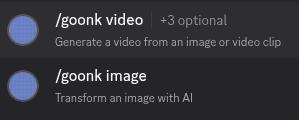
- Use /goonk to enhance images
Invite to Your Server
Need Premium plan to add the bot to your own server. Click here to know how →
Need Help?
Open a ticket in our Discord →
Commands
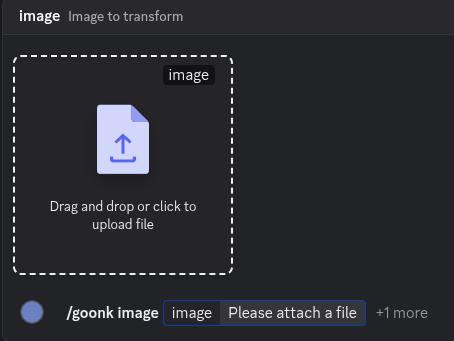
/goonk image
Enhance an image or avatar. Upload a file or mention a user.
Cost: 1 token
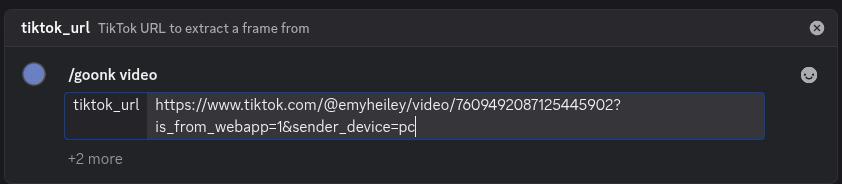
/goonk video
Create videos from images or extract frames. Upload a file or paste a TikTok/YouTube link.
Cost: 6 tokens
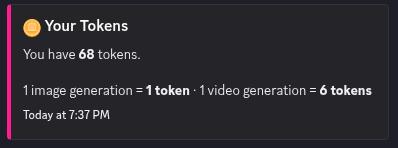
/tokens
Check your token balance.
/leaderboard
See top users by generation count.
Need Help?
Open a ticket in our Discord →
Cooldowns
Wait time between uses:
| User Type | Wait Time |
|---|---|
| Free | 15 minutes |
| Paid (bought any plan) | 2 minutes |
Need Help?
Open a ticket in our Discord →
Token System
Tokens are what you spend to use the bot. Each image costs 1, videos cost 6.
Token Types
- Premium — From Premium plan
- Pro — From Pro plan
- Basic — From Basic plan
- Free — Earned by chatting
Usage Order
Tokens used in this order: Premium → Pro → Basic → Free
Earn Free Tokens
Chat in our Discord to earn free tokens automatically!
Need Help?
Open a ticket in our Discord →
Invite to Your Server
You need the Premium plan to invite Goonk | Uncensored AI | NSFW AI Video and Image Generator to your own Discord server. Here's how:
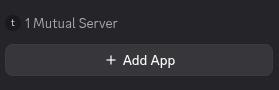
Step 1: Click Add App
Click "Add App" to invite the bot to your server.
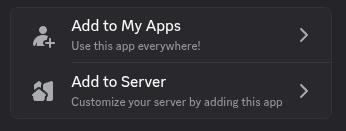
Step 2: Select Your Server
Choose which server you want to add Goonk | Uncensored AI | NSFW AI Video and Image Generator to.
Step 3: Authorize
Click authorize and you're done! The bot is now in your server.
Need Help?
Open a ticket in our Discord →
Buying Tokens
- Basic Plan
- Pro Plan
- Premium Plan (also lets you invite bot to your server)
Instant payment. View Plans →
Payment Methods
Direct Crypto:

BTC

ETH

BNB

SOL

USDC

USDT
Buy Crypto via:

MoonPay

Changelly
Cash App

PayPal
Robinhood
Venmo
Crypto only. Buy via MoonPay, Changelly, or similar platforms first.
Need Help?
Open a ticket in our Discord →
Referral Program
Invite friends to Goonk | Uncensored AI | NSFW AI Video and Image Generator and earn free tokens every time someone you referred makes their first purchase. There's no cap — keep referring, keep earning.
You get +30 tokens automatically when any referred user completes their first purchase.
How it works
- Get your referral link — go to the Earn page → and log in with Discord.
- Share your link — paste it in Discord, Twitter, Telegram, or anywhere your friends hang out.
- They visit and log in — the moment they click your link and authenticate with Discord, they're tracked as your referral automatically.
- They make a purchase — when they buy any plan (Basic, Pro, or Premium) for the first time, you receive +30 tokens instantly.
- Repeat. No limit on how many people you can refer.
Important: the purchase must go through your link
Your friend needs to visit the site using your referral link before they purchase. If they go directly to the site without clicking your link, the referral won't be counted. Make sure they use your link when signing up.
Tracking your referrals
On the Earn page you can see:
- Total referrals — everyone who signed up via your link
- Purchased — how many of them have bought a plan (these are the ones that earned you tokens)
- Tokens earned — total tokens you've received from referrals
You can also see the full list of people you've referred, their status (signed up vs purchased), and the leaderboard showing top referrers.
Using the /referral command
In Discord, type /referral to get your referral link and a quick stats summary directly in chat (ephemeral — only you can see it).
Need Help?
Open a ticket in our Discord →
Affiliate Program
The affiliate program is for content creators and influencers who want to earn a commission on every sale they drive. Unlike referrals (token rewards), affiliates earn real cash commissions.
You earn a percentage commission on every purchase made through your unique affiliate link. Commissions are tracked automatically and paid out on request.
How it works
- Apply — fill in the application on the Affiliate Program page →. Tell us about your audience and share your analytics screenshots.
- Get reviewed — we review applications within 48 hours. If approved, you'll receive your affiliate link.
- Share your link — post it on TikTok, Instagram, YouTube, Twitter, Telegram, or anywhere your audience is.
- Earn on every sale — anyone who clicks your link and purchases a plan earns you a commission automatically.
- Request payout — once you've hit the minimum threshold, request a payout from your affiliate dashboard.
Who can apply?
Anyone with an engaged audience in a relevant niche — AI, image editing, tech, gaming, Discord communities, or social media. We don't require a minimum follower count, but we do look at engagement quality.
What to include in your application
- Social media accounts — list all platforms and handles with follower counts
- Analytics screenshots — upload screenshots of your account analytics so we can assess reach and engagement
Your affiliate dashboard
Once approved, you get access to the Affiliates dashboard → where you can see:
- Total clicks — how many people clicked your affiliate link
- Conversions — how many of those clicks turned into purchases
- Revenue generated — total sales value attributed to you
- Your commission — your earnings ready for payout
Difference from referrals
- Referral Program — anyone can join, rewards are tokens, no application needed
- Affiliate Program — application required, rewards are cash commissions, designed for creators with an audience
Ready to apply?
Open the Affiliate Program page →
Need Help?
Open a ticket in our Discord →